A step-by-step guide to writing blog posts that rank on Google, drive consistent organic traffic, and keep readers on the page.

Research Node
Google SERP
Text Node
Claude Opus 4.7
Image Node
Google Nano Banana
Most blog posts never get read. Not because the writing is bad — because nobody finds them.
You can spend four hours on a thorough, well-researched post and still watch it sit on page six of Google with zero traffic. The gap between posts that rank and posts that disappear isn't talent. It's process. Writing for SEO means making deliberate decisions before you write, while you write, and after you publish — decisions that tell search engines exactly what your content is about and why it deserves to rank.
In this guide, we'll cover what SEO-friendly content actually means, why it matters for organic growth, and a step-by-step process you can follow for every post you publish. We've also included a dedicated section on how to run the full workflow inside DFIRST, so you can cut research and drafting time without cutting corners.
Here's what we're covering:
What an SEO-friendly blog post is
Why SEO writing drives organic traffic
How to write SEO-friendly blog posts, step by step
How to write SEO-friendly blog posts using DFIRST
Common mistakes that kill your rankings
Let's get into it.
Produce on-brand content
GPT Image
Nano Banana
Runway
Claude
Recraft
Instagram Scraper
Google Search
Deep Research

What is an SEO-Friendly Blog Post?
An SEO-friendly blog post is a piece of written content structured and optimized to rank well in search engine results pages (SERPs) while genuinely serving the reader who finds it. SEO-friendly blog posts sit at the intersection of 2 goals: satisfying the technical and contextual signals Google uses to evaluate content, and directly answering the question a reader typed into the search bar.
The purpose of SEO writing is to make your content easy to find, easy to read, and easy to trust — not to game an algorithm. SEO-friendly posts combine keyword research, search intent alignment, clear header hierarchy, semantic relevance, and on-page elements — such as optimized title tags, meta descriptions, internal links, and image alt text — to give search engines enough context to rank the content accurately and give readers enough value to stay and convert.
Why Do You Need SEO-Friendly Blog Posts?
Organic search is the only content channel that compounds over time, and SEO-friendly blog posts are what drive that compounding.
Every post you publish without SEO intent is a missed opportunity. Your content may be excellent — but if Google can't determine what it's about, who it's for, or why it should rank above competing pages, it won't. Search engines rely on 5 specific signals to make ranking decisions: keyword relevance, structural clarity, topical authority, content depth, and user engagement. Without those signals, even your best writing stays invisible.
There's also a straightforward business case. SEO blog posts work for you after you publish them. A well-ranked post published today can drive qualified traffic for years without additional spend. Paid ads stop the moment your budget does.
Writing SEO-friendly blog posts consistently produces 5 measurable outcomes for your business:
Compounding organic traffic — Each post you rank adds to a growing base of search visibility that strengthens over time.
Lower customer acquisition cost — Organic traffic doesn't cost per click. Your investment is writing time, not ad budget.
Topical authority — Ranking for the questions your audience is searching positions your brand as the go-to expert in your space, which makes future content easier to rank.
Higher-intent readers — People who find you through search are actively looking for what you offer. That's a warmer audience than most paid channels produce.
Evergreen assets — A well-optimized post, refreshed regularly, can hold a top-five ranking for years without a full rewrite.
How to Write SEO-Friendly Blog Posts
Writing an SEO-friendly blog post follows a 7-step repeatable process. The more consistently you follow it, the faster it becomes. Here's a quick outline:
Do keyword research
Understand search intent
Structure your post before you write
Write for readers, optimize for search
Nail your on-page SEO elements
Build internal and external links
Review, publish, and maintain
Let's get into each step.
#1: Do Keyword Research
Every SEO blog post starts with a keyword — the specific phrase your target audience types into Google when looking for what you cover. If you skip this step, you're writing content nobody is searching for.
Use a keyword research tool — such as Ahrefs, Semrush, Google Keyword Planner, or Google's autocomplete — to find a primary keyword with real search volume and manageable competition. For newer blogs or domains with lower authority, target long-tail keywords: specific, multi-word phrases like "how to write SEO-friendly blog posts for beginners" rather than broad terms like "SEO tips."
Once you have a primary keyword, build a cluster of 5–8 semantic keywords — related terms and phrases that belong to the same topic. These are the terms Google expects to see in a thorough post, and weaving them in naturally is what separates a thin post from a complete one.
Pro Tip: Run your primary keyword through Google and read the "People Also Ask" and "Related Searches" sections. These are keyword goldmines — real questions from real searchers that you can answer inside the same post, building topical depth without adding fluff.
#2: Understand Search Intent
Before you write, look at the top 5 results for your target keyword. What format are they using — step-by-step guides, listicles, comparison pages, opinion essays, product reviews? That's Google showing you what type of content its users want for this query.
Search intent is the "why" behind a search query. It falls into 4 types:
Informational — The reader wants to learn something, such as "What is on-page SEO?"
Navigational — The reader is looking for a specific page or brand, such as "Ahrefs login."
Commercial — The reader is researching before making a decision, such as "Best SEO tools for small business."
Transactional — The reader is ready to act, such as "Buy Semrush subscription."
Your content format, depth, and angle must match the dominant intent for your keyword. If you write a 3,000-word think-piece when the top 5 results are all quick how-to guides, you're working against what Google already knows its users want — and your rankings will show it.
Common Mistake: Assuming that longer always wins. Depth matters, but fit matters more. A 1,200-word post that matches search intent will outrank a 4,000-word post that misses the format. Read the SERP before you outline.
#3: Structure Your Post Before You Write
A clear structure makes your post easier to read, easier for Google to parse, and easier to write — because you know where you're going before you start.
Every SEO blog post needs a 3-level header hierarchy:
H1 — Your page title. One per post. Includes your primary keyword.
H2s — Major sections. Each covers a distinct part of the topic.
H3s — Sub-points within each H2 section.
Build your outline around your reader's journey:
Hook — Why should they keep reading?
What and why — What is this, and why does it matter to them?
The core how-to — The step-by-step they came for.
Supporting depth — Examples, tips, tools, common mistakes.
Conclusion and next step — What should they do now?
Place your primary keyword in your H1, at least one H2, your opening paragraph, and your meta description. Use it naturally — don't force it into every section.
#4: Write for Readers First, Optimize Second
Google's business depends on its users finding content that helps them. Its algorithm recognizes genuine value — and penalizes posts that chase keyword density over substance.
Write for your reader first. Get to the point fast. Put the answer near the top, not buried in the seventh paragraph. Keep paragraphs to 2–3 sentences. Write the way a knowledgeable colleague would explain something, not the way a textbook would.
4 non-negotiable writing rules for SEO:
Open with a hook under 15 words. Your first sentence needs to earn the second.
Answer early. Give the core takeaway in the first paragraph of each section. Readers scan before they read.
Use formatting as a reading aid. Bold key terms. Use bullet lists when items don't need narrative. Use H3 subheadings to break up long sections.
Write plainly. Simpler writing is more considerate of your reader's time — not less credible.
Once your draft is done, check keyword placement. Add semantic keywords where they fit naturally. If a sentence feels stuffed, it is.
Pro Tip: Read your post out loud before publishing. Every sentence you stumble on is a sentence a reader will abandon. Rewrite until it flows.
#5: Nail Your On-Page SEO Elements
On-page SEO is the set of 6 technical signals you add after writing that tells search engines what your page is about. These aren't optional extras — they're the difference between a post Google understands and one it has to guess at.
Work through each element on every post you publish:
Title tag (H1) — Include your primary keyword. Keep it under 60 characters. Make it specific enough that a reader knows exactly what they're getting.
Meta description — 150–160 characters. Include the primary keyword and give a clear reason to click. It doesn't directly affect rankings, but it drives click-through rate.
URL slug — Short, readable, keyword-inclusive. Use hyphens between words. Avoid dates, numbers, or stop words. For example:
/how-to-write-seo-friendly-blog-posts.Image alt text — Describe every image and include your primary keyword where it fits. This helps Google index your images and improves accessibility.
First 100 words — Your primary keyword should appear early in the body. It's a direct relevance signal.
Content depth — Check the word count of your top-ranking competitors. Match or exceed it with genuinely useful content, not padding.
#6: Build Internal and External Links
Links are how authority flows across the web and across your own site. Skipping this step is one of the most common and costly SEO mistakes bloggers make.
Internal links point to other pages on your own site. They help Google crawl and understand how your content connects, and they keep readers on your site longer.
Aim for 2–5 internal links per post.
Use descriptive anchor text — not "click here," but the actual topic name, such as "keyword research guide."
Link to pillar pages and related posts that deepen the reader's understanding of your topic.
External links point to credible sources outside your site. They tell Google your content is well-researched and grounded in real information.
Link to authoritative sources: research studies, industry publications, official documentation.
Avoid linking to direct competitors.
Set external links to open in a new tab.
Common Mistake: Treating internal links as an afterthought. Every post you publish has internal link potential — to older posts, your product pages, related guides. Go back and add links to relevant older posts. It's one of the highest-return SEO tasks you can do, and it takes minutes.
#7: Review, Publish, and Maintain
Before you publish, run through this 8-point checklist:
Primary keyword in H1, opening paragraph, at least one H2, and meta description
URL slug is short, clean, and keyword-inclusive
All images have descriptive alt text with the keyword where natural
2–5 internal links with descriptive anchor text
1–2 external links to credible sources
Meta description under 160 characters with a clear reason to click
Content format matches the search intent of the target keyword
Post is scannable — short paragraphs, subheadings, no walls of text
After publishing, submit the URL in Google Search Console to speed up indexing. Track rankings and organic traffic weekly for the first month, then monthly. Set a reminder to revisit every top-performing post at the 6- and 12-month marks. Refreshing content — adding new information, updating examples, improving structure — is the most reliable way to hold a ranking over time.
How to Write SEO-Friendly Blog Posts Using DFIRST
You now have the full process. The challenge most content teams face isn't knowing what to do — it's the time it takes. Keyword research, competitor analysis, outlining, drafting, on-page optimization: done manually, a single well-optimized post can take the better part of a day.
DFIRST is an AI marketing platform that runs that entire workflow inside one canvas — without cutting the quality that makes posts rank.
Here's exactly how to produce an SEO-friendly blog post from scratch in DFIRST.
Step 1: Open a New Whiteboard and Add a Research Node
Open DFIRST and create a new Whiteboard. This is your working canvas for the entire post.
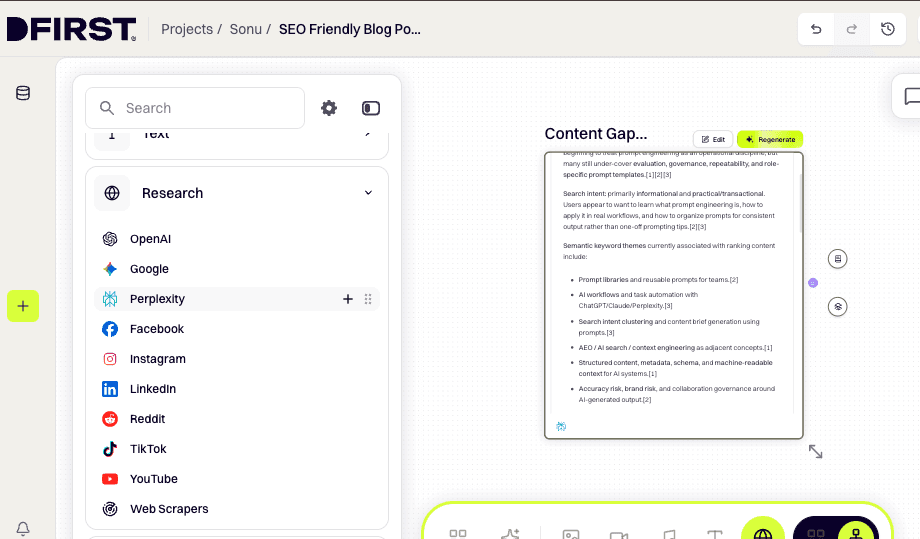
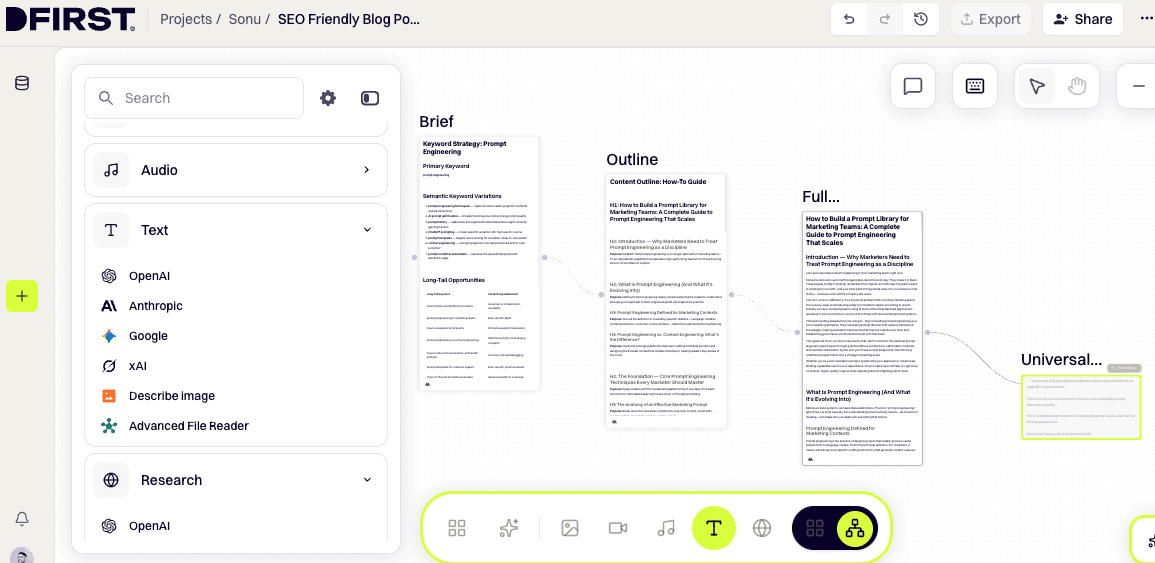
Switch to Canvas View using the toggle in the top right of the whiteboard. From the left toolbar, navigate to Tools → Perplexity, hover over your preferred research tool (use Deep Research for a comprehensive brief, or Sonar for a fast overview), and click the + button that appears on the right. The Research Node appears on the canvas.
Open ⚙ Configure on the node. In the prompt field, enter your target keyword and what you need — for example:
Research top-ranking content for the keyword "prompt engineering".
Return: related questions, semantic keyword themes, search intent, and content gaps
compared to currently ranking articles.
Click Generate. DFIRST returns a synthesized research report covering facts, stats, citations, and related topic areas for that keyword.
Where to find it: Left toolbar → Tools → RESEARCH → hover over tool → click + → click ⚙ Configure → enter prompt → click Generate
Step 2: Add a Text Node to Extract Your Keyword Strategy
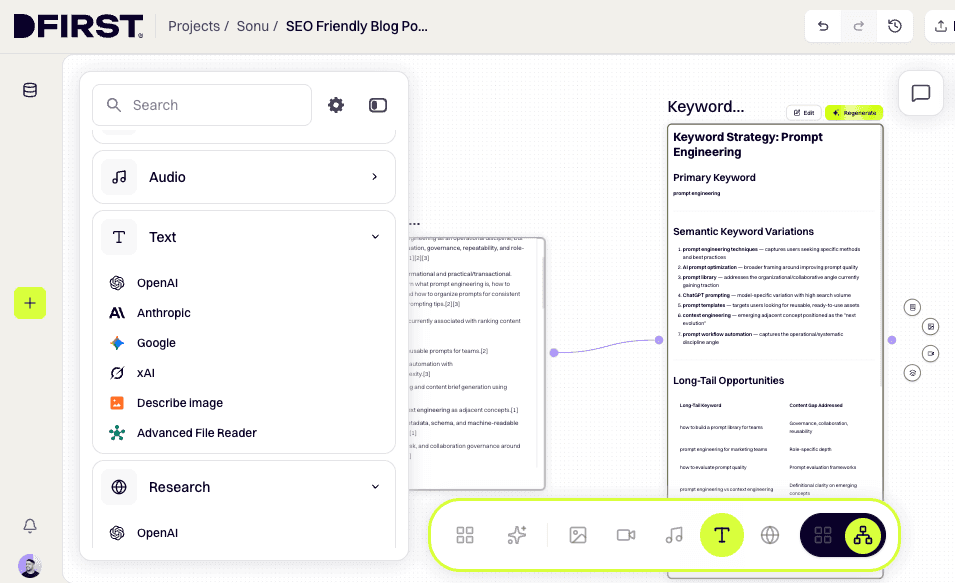
Connect a Text Node to the output of your Research Node. This node takes the research as context and extracts your keyword and content strategy.
In the left toolbar, go to Tools → TEXT, hover over your preferred provider (e.g. Anthropic or OpenAI), and click +. Drag the output point (right side) of the Research Node and connect it to the input point (left side) of the new Text Node.
Click ⚙ Configure on the Text Node and enter a prompt like:
Using the research provided, extract a keyword strategy for this topic.
Return: primary keyword, 5–8 semantic keyword variations, long-tail opportunities,
and the search intent classification (informational, commercial, or transactional).
Click Generate. Review the output and confirm your primary keyword and intent type before moving to the next step. This locks your content angle before you write a word.
Pro Tip: If the intent comes back as commercial but you're writing an educational guide, adjust your angle now. Intent mismatch at this stage costs you rankings regardless of writing quality.
Step 3: Add a Text Node to Generate Your Content Outline
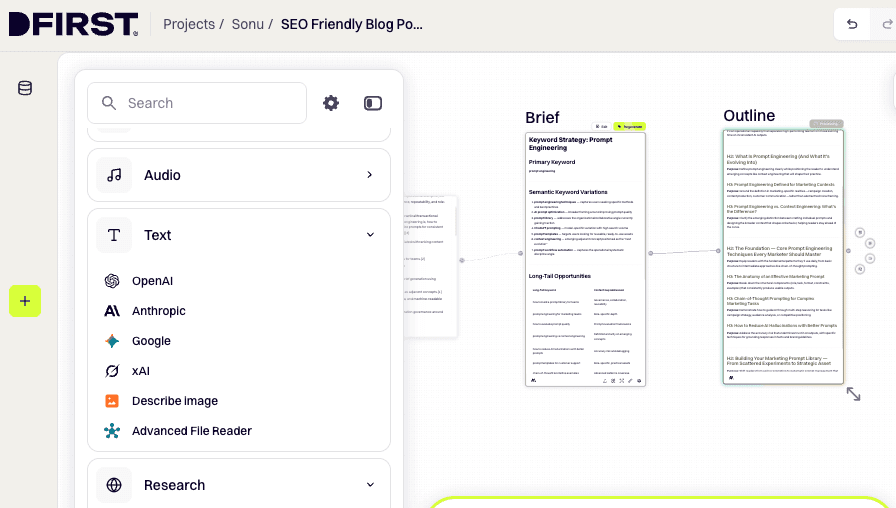
Add a second Text Node and connect it to the output of your keyword strategy Text Node. This node produces the full article outline.
Click ⚙ Configure and enter a prompt such as:
Using the keyword strategy provided, write a full content outline for a how-to guide.
Include: an H1 title, H2 section headings, H3 sub-headings where needed, and a one-line
purpose description for each section. Target audience: [your reader profile].
Click Generate. DFIRST produces a structured H1/H2/H3 outline. Review it against the top-ranking results for your keyword. Reorder or rename sections as needed — you can edit the node output directly before connecting it to the draft stage.
Step 4: Connect a Text Node and Generate Your Full Draft
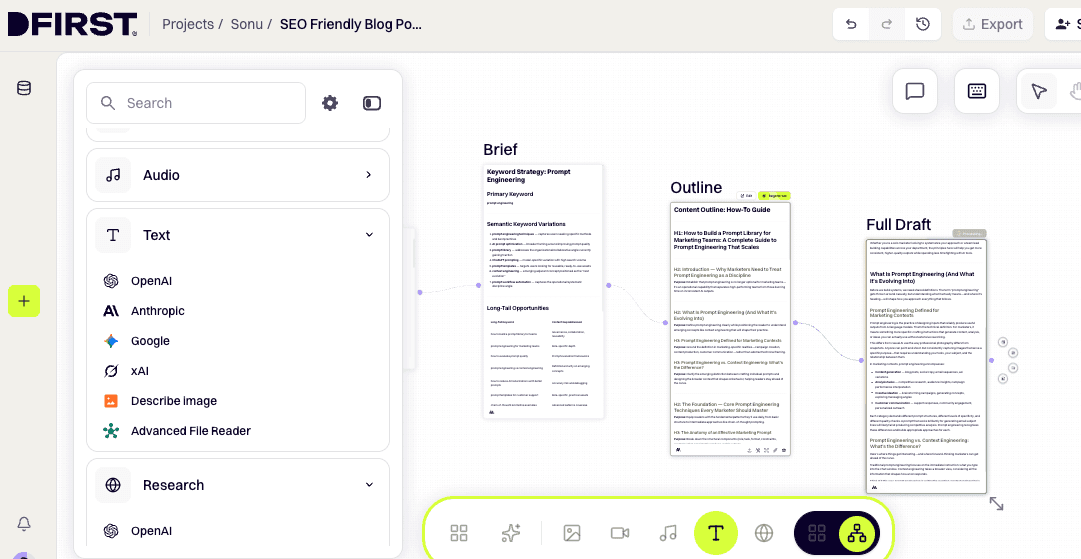
Add a third Text Node and connect it to your outline node output. This is where the full draft gets written.
Click ⚙ Configure on the Text Node. In the prompt field, write your drafting instruction — including your target word count, tone, and a reminder to weave in the keyword cluster from the earlier node. Because context flows through the connectors automatically, you don't need to paste the outline or keyword list — just reference them:
Using the outline and keyword strategy provided, write a complete SEO-optimised blog post draft.
Match the H1/H2/H3 structure exactly. Tone: [your brand voice].
Target length: [word count]. Naturally integrate the primary keyword and semantic variations
throughout — in the intro, at least two H2 sections, and the conclusion.
End with a clear next-step CTA.
Click Generate. DFIRST writes a full draft — introduction, all body sections with proper heading structure, and a conclusion — using the connected context as its guide.
Optional: Click the ⚡ Enhance prompt with AI icon in the config panel to expand and sharpen your instruction before generating (~7–15 seconds).
Step 5: Add a Universal Tool Node to Run an SEO Audit
Add a Universal Tool Node by clicking and holding the output point of your draft Text Node, then dragging to an empty area of the canvas. Release — a Universal Tool Node appears and is automatically connected.
In the node's prompt field, enter your SEO audit instruction:
Review the blog post draft provided and return a prioritised list of on-page SEO improvements.
Check for: keyword placement in the intro and subheadings, meta description quality,
thin or underdeveloped sections, heading hierarchy issues, and internal linking opportunities.
Return each issue with a recommended fix.
Click Generate. Work through each flagged item. Most fixes take under a minute — placing the keyword earlier in the intro, tightening a weak subheading, fleshing out a short section. Once you've applied the recommendations, your draft is ready for publishing.
Where to find it: Drag from the output point of the draft Text Node → release on empty canvas → Universal Tool Node appears pre-connected
Step 6: Generate a Blog Cover Image
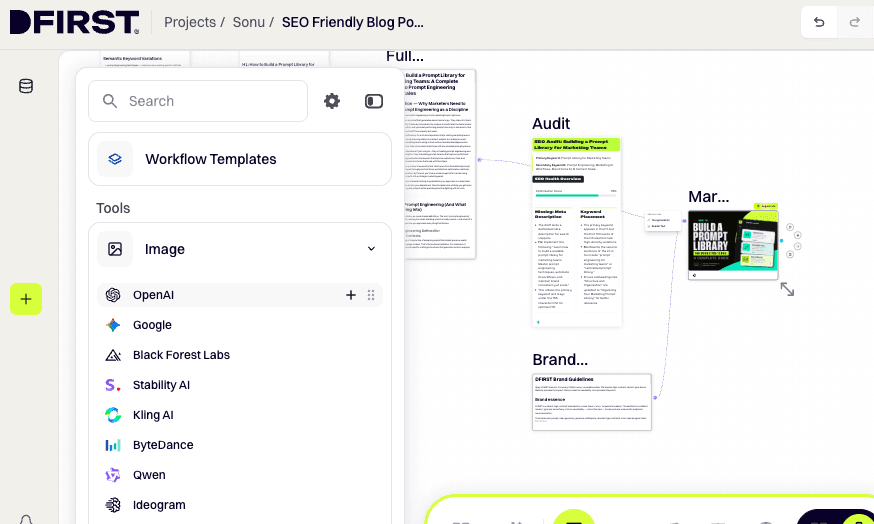
Add an Image Node to create a professional cover image for your post.
In the left toolbar, go to Tools → IMAGE, hover over your preferred provider (use Ideogram for covers with text/typography, or GPT Image for photographic-style visuals), and click +. Connect this node to your draft Text Node so it has full context about the post topic.
Click ⚙ Configure and write your image prompt:
Create a professional blog cover image for an article titled "[your H1]".
Style: clean, modern, content-marketing aesthetic.
Include the title text as a typographic overlay. 16:9 aspect ratio.
Set your aspect ratio to 16:9 and select your quality setting. Click Generate.
Cost: Standard image models ~1 credit/image. Premium models (e.g. Ideogram v3, Flux Pro) ~5 credits/image.
Tip: If you want the title text rendered accurately in the image, Ideogram has the strongest text rendering of any image model in DFIRST.
Step 7: Export and Publish
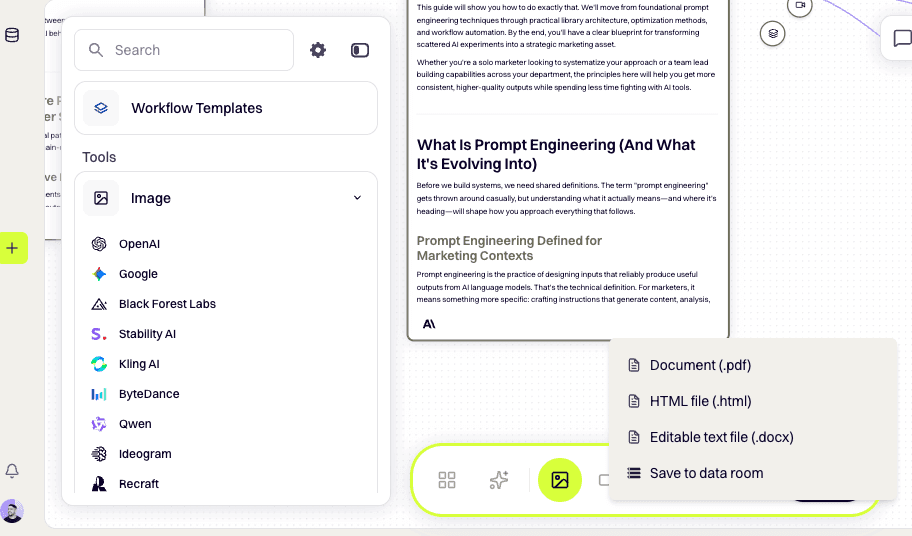
When your draft and cover image are ready, click the triple dots (…) in the top menu of the whiteboard, then select Export. Choose your format:
DOCX — editable, bundled as ZIP. Best for passing to an editor or CMS.
PDF — non-editable, clean layout.
PNG — exports the whiteboard canvas as an image.
Copy the final draft into WordPress, Webflow, Contentful, or your CMS of choice. Add internal links, upload your cover image with alt text, set your meta description, and publish. Submit the URL to Google Search Console to trigger indexing.
Key principle: Each node's prompt contains only the instruction. Context — research, keywords, outline — flows automatically through the connector lines. You never need to copy-paste between steps.
Common SEO Blog Writing Mistakes to Avoid
Even experienced writers repeat these 6 mistakes. Catching them before you publish is the difference between a post that ranks and one that stalls.
Keyword stuffing. Repeating your target keyword so often the writing sounds forced. Google detects unnatural keyword density and penalizes it. Place your primary keyword in your H1, opening paragraph, one H2, and meta description — then fill the rest with semantic variations.
Writing without checking intent first. You can write the best how-to guide in your niche and still fail to rank if the top results are all listicles. Match your format to the SERP before you outline, not after.
Thin content. Posts under 600 words rarely rank for competitive keywords. But length alone doesn't help — every sentence needs to add real information. Padding with restatements is as bad as writing too little.
Missing or generic meta descriptions. The meta description is the first thing a searcher reads before deciding to click. A blank or auto-generated meta wastes the impression. Write one deliberately for every post.
No internal links. Every post you publish without linking to your other content misses a chance to build site authority and pull readers deeper. Add internal linking to your publishing checklist — not your cleanup list.
Publishing and forgetting. SEO is not a one-time task. Search intent shifts. Competitors update their content. Algorithms change. Your best posts need a review every 6–12 months — update stats, add new sections, refresh examples — to hold their rankings.
Conclusion
SEO-friendly blog writing is a skill that gets faster the more consistently you practice it. Do keyword research before you write. Match your format to search intent. Structure before you draft. Optimize your on-page elements deliberately. Add internal and external links to every post.
Follow that process consistently, and the rankings follow. If you want to cut the time it takes, DFIRST runs the full workflow — research, keyword analysis, outline, draft, SEO audit — in one canvas, so you spend your time reviewing and publishing instead of starting from scratch every time.
Share It On:
