Mine real customer language from reviews, forums, and social media — and turn it into copy, messaging, and positioning your audience instantly recognizes.
Scraper Node
Reddit & Instagram
Text Node
Claude Opus 4.7
Research Node
Deep Research
Your brief says "speak the customer's language." Your copy reads like a product spec.
That gap isn't a writing problem. Most marketers start from the inside out — what the product does, then translate it into benefits. VoC mining works the other way. You start at Reddit, review sites, and comment sections. You find the exact phrases customers use when they describe their problem. Then you write copy that plays those phrases back.
The hard part is doing it at scale. Reading through hundreds of threads to find the signal takes hours. DFIRST's scraper and research nodes cut that down to minutes — they pull the raw data, and a language model extracts the patterns. The output lands on your Whiteboard, ready to feed into copy nodes.
This guide shows you how to build that workflow from scratch.
Key Takeways
You will be able to scrape Reddit threads, Instagram comments, and TikTok content to extract real customer language at scale using DFIRST's scraper nodes.
You will know how to chain a scraper node into a Universal Tool Node to identify recurring pain points, desires, and objections from raw social data.
You will have a ready-to-use VoC workflow that feeds directly into ad copy, email subject lines, or positioning statements — all in one canvas.
What you're working with
Scraper Nodes pull data from public social platforms. The Reddit Scraper grabs threads, comments, upvotes, and timestamps from any subreddit. The Instagram Scraper pulls post captions, hashtags, likes, and comments from public profiles. The TikTok Scraper gets video metadata and captions from accounts or hashtags. Each scraper outputs raw text the next node can work with. All social scrapers are accessible via Tools → RESEARCH in the left toolbar.
Research Nodes fill in the gaps when scraper data is thin. Quick Research gives you fast facts and overviews. Deep Research goes deeper — reading news, papers, and forums across multiple sources to produce long-form reports. It's the better choice for niche markets where Reddit threads alone won't give you enough signal.
Text Nodes and the Universal Tool Node handle the analysis. Once social data flows in from a scraper, you point a Universal Tool Node at it with an instruction: extract pain points, flag recurring phrases, list objections. A Text Node downstream takes those findings and turns them into copy — ad headlines, email subjects, or positioning written in the customer's own words.
The Data Room gives the whole chain a brand anchor. Upload your guidelines, past copy, and audience personas there. Any node connected to a Data Room file uses that context to keep the output on-brand, not just on-topic.
Before you start
You have a DFIRST account with a Workspace already created for the brand or product you're researching.
Your plan is Tier 4 or above — social scrapers (Reddit, Instagram, TikTok) require Tier 4+.
You have at least one Data Room file ready: a brand guidelines doc, a product description, or an audience persona. This improves output quality significantly.
You know your target subreddit name, Instagram account handle, or TikTok hashtag to scrape.
You have enough credits for the workflow: scraping a large site costs ~20 credits; text generation runs ~1–2 credits per node.
Step-by-step process
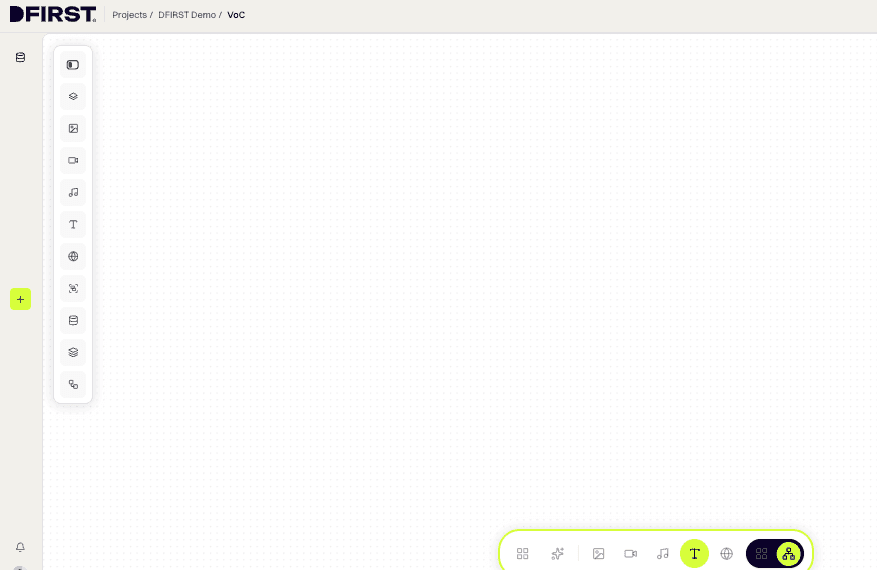
1. Open a Whiteboard and switch to Canvas View
Open your project and click + New Whiteboard or select an existing one. In the top right of the Whiteboard interface, click the toggle to switch from Feed View to Canvas View. The infinite canvas with the left toolbar panel is now active.
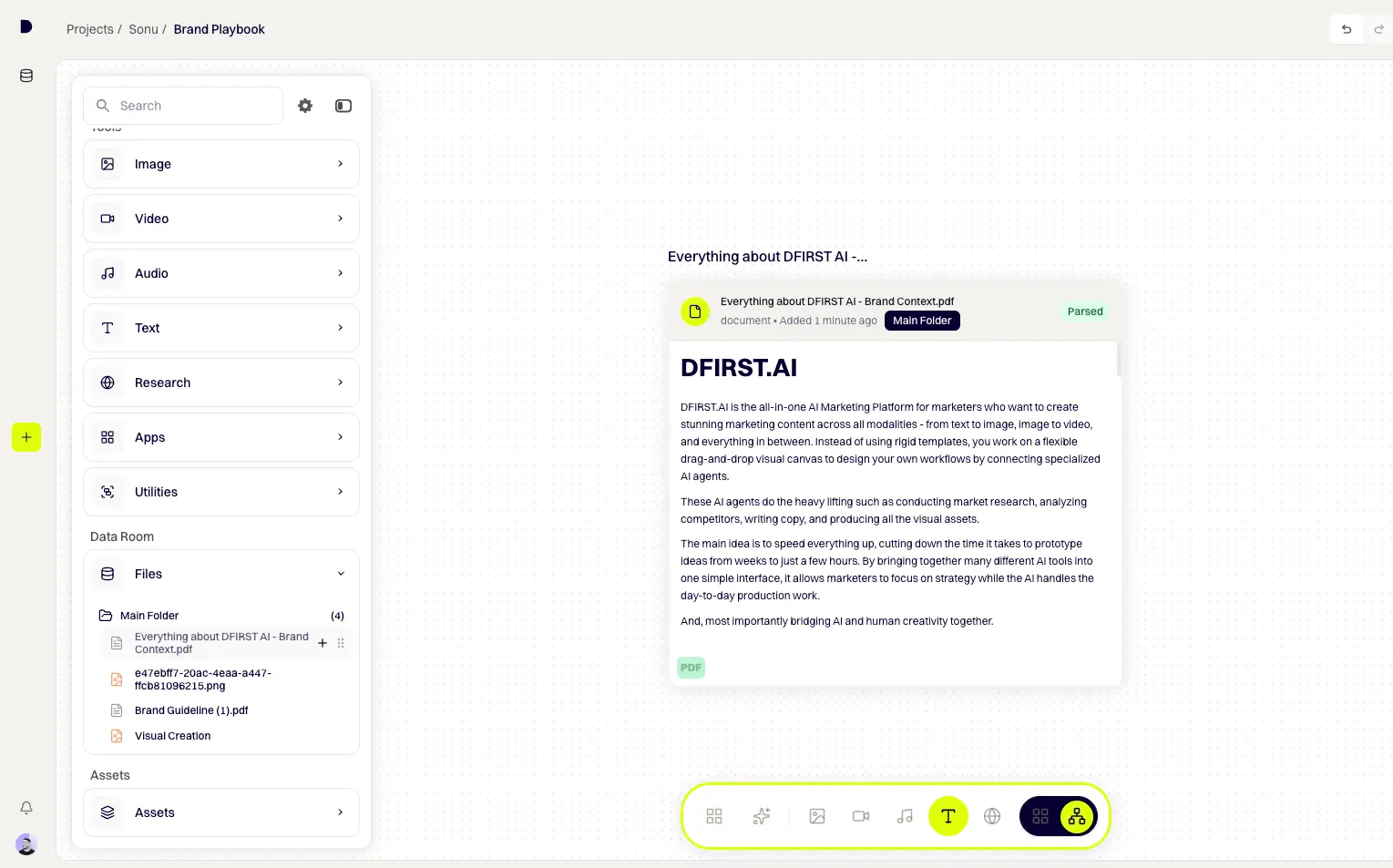
2. Add your Data Room file as a starting node
In the left toolbar, expand DATA ROOM → Files → Main Folder. Hover over your brand guidelines or audience persona file and click the + button. The file appears as an input node on the canvas. This gives all downstream nodes brand and audience context automatically.
Where to find it: Left toolbar → DATA ROOM → Files → Main Folder → hover over file → click +
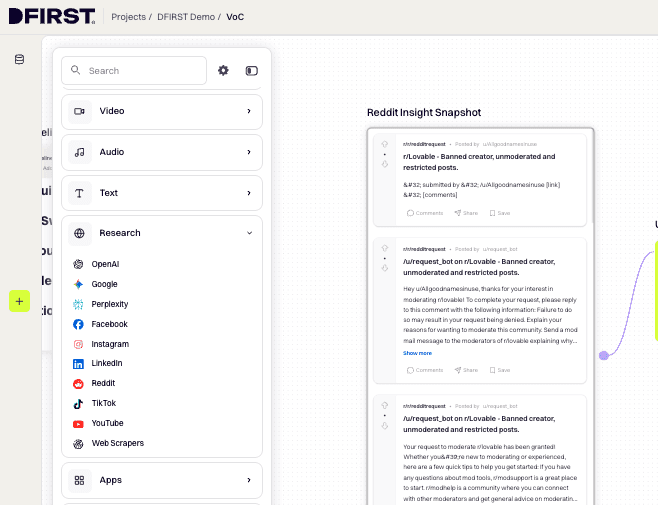
3. Add a Reddit Scraper node
In the left toolbar, expand Tools → RESEARCH, hover over Reddit, and click +. A Reddit Scraper node appears on the canvas. Click ⚙ Configure to open the configuration panel.
In the prompt field, enter the subreddit and what you want extracted. Be specific:
Scrape the top 30 posts and top comments from r/[your_subreddit].
Focus on posts where users describe a problem they were trying to solve,
a product they switched from, or frustration with current solutions.
Click Generate. The node returns threads, comments, and metadata as structured text.
Where to find it: Left toolbar → Tools → RESEARCH → hover over Reddit → click +
4. Connect the Data Room node to the Reddit Scraper
Hover over the Data Room node. A connection point appears on its right edge. Click and hold that output point, drag the line to the left-side input point of the Reddit Scraper node, and release. A visible connecting line appears, and the Reddit Scraper node turns white to confirm the connection. The scraper now has your brand context available.
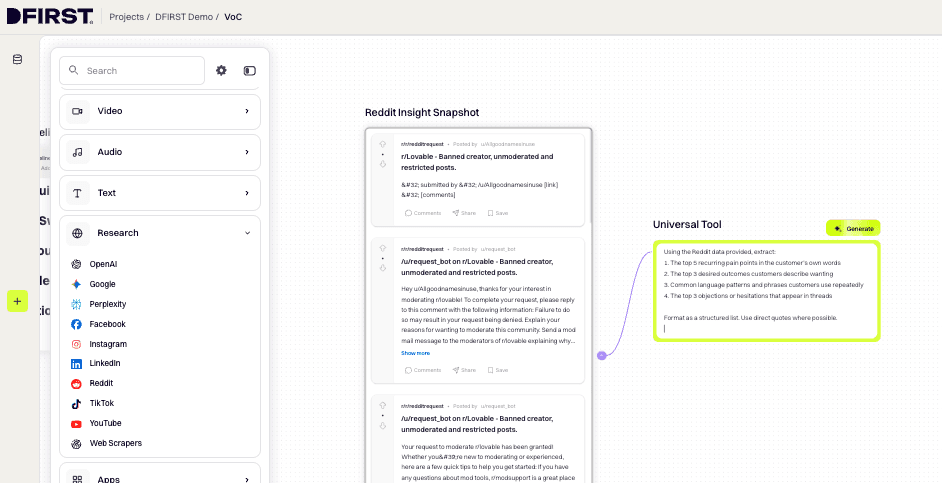
5. Add a Universal Tool Node to extract VoC patterns
Hover over the Reddit Scraper node until the connection point appears on its right edge. Click and hold the output point, then drag to empty canvas space and release — the node automatically drops as a Universal Tool Node, pre-connected to the Reddit Scraper.
Click ⚙ Configure and type your analysis instruction in the prompt field:
Using the Reddit data provided, extract:
The top 5 recurring pain points in the customer's own words
The top 3 desired outcomes customers describe wanting
Common language patterns and phrases customers use repeatedly
The top 3 objections or hesitations that appear in threads
Format as a structured list. Use direct quotes where possible.
Click Generate. The node outputs a structured VoC insight report.
6. Add a second scraper for social platforms (optional but recommended)
Repeat Step 3 using Instagram or TikTok from Tools → RESEARCH. Configure it to scrape a competitor's profile or a relevant hashtag. Connect it as a second input to the Universal Tool Node so both data sources are analyzed together.
Pro tip: Connect multiple scraper nodes into the Universal Tool Node to analyze all sources together in a single pass.
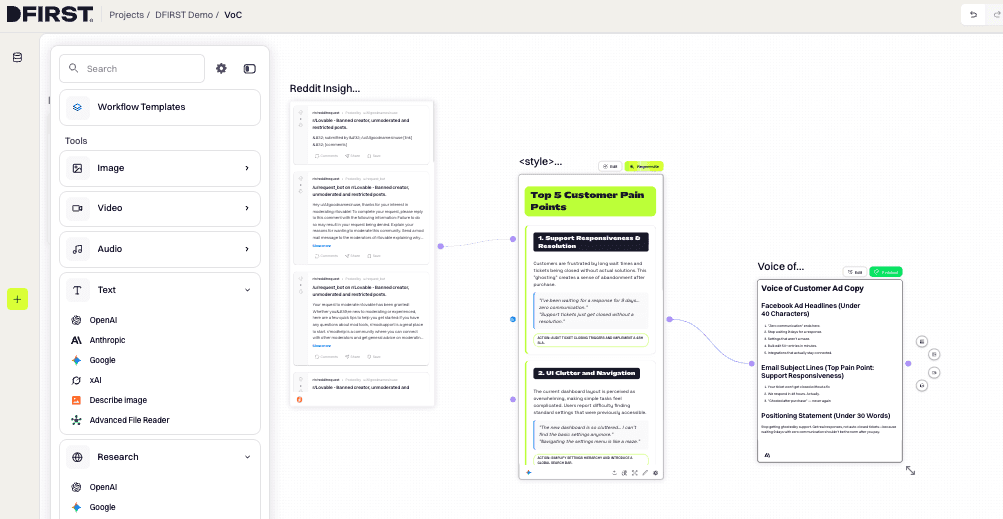
7. Add a Text Node to generate copy from the VoC insights
In the left toolbar, expand Tools → TEXT, hover over Anthropic, and click + to add a Claude Text Node. Connect the output of the Universal Tool Node to the input of this Text Node.
Click ⚙ Configure. In the prompt field, write only the instruction — the VoC data flows in automatically from the connected node:
Using the Voice of Customer insights provided, write:
5 Facebook ad headlines (under 40 characters each) that mirror the customer's exact language
3 email subject lines that speak directly to the top pain point
1 positioning statement (under 30 words) that addresses the primary desired outcome
Do not use marketing language. Use the customer's own phrases wherever possible.
Select your model — click the model name in the bottom left of the config panel and choose Claude Sonnet 4.5 or Claude Opus 4.5 for best results on nuanced language tasks.
Click Generate.
8. Add Deep Research to fill gaps in the social data
If your scraper returns thin results (niche market, private community, low-volume subreddit), add a Deep Research node alongside the scrapers. In the left toolbar, expand Tools → RESEARCH, look for Deep Research by name, and click +.
Click ⚙ Configure and enter a prompt instructing it to research market pain points, competitor reviews, and category language for your product area.
Connect it to the Universal Tool Node as an additional input. It supplements the scraper data with cited, multi-source context.
Where to find it: Left toolbar → Tools → RESEARCH → hover over Deep Research → click +
9. Run the full workflow
Click the RUN button in the top menu bar to generate all nodes in sequence. The canvas executes nodes from left to right — Data Room → Scrapers → Universal Tool → Text Node. Watch the progress indicator on each node. When complete, the Text Node contains your VoC-driven copy assets.
10. Save the VoC insights to the Data Room
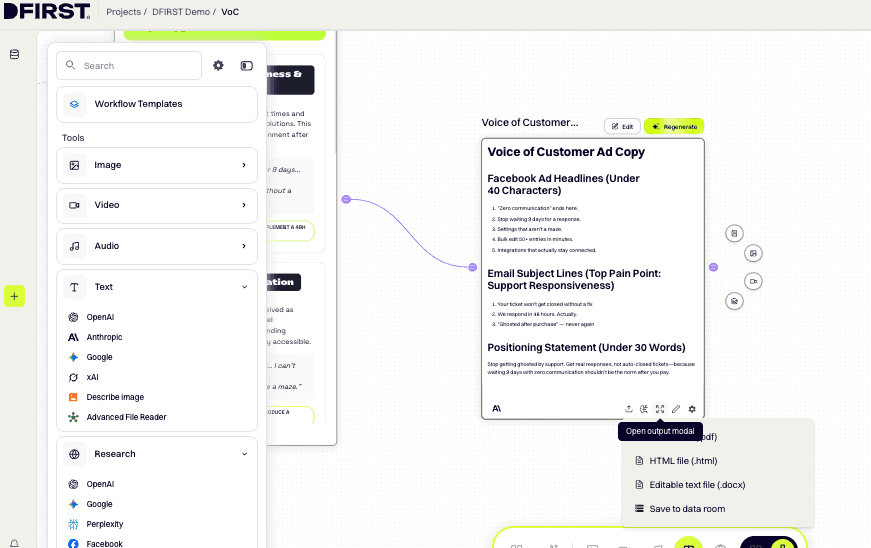
To preserve the Universal Tool Node output for use in future campaigns, copy the text from the node. Open a plain text editor, paste the output, and save it as a TXT or DOCX file.
Then upload it to your Data Room: from the left sidebar, click Data Room → Documents, click + Add Data, and select your saved file. Once uploaded, the VoC insight report is available to every future Whiteboard in this Workspace — any node can reference it as upstream context.
Where to find it: Left sidebar → Data Room → Documents → + Add Data → select file
Variations and alternate approaches
Use Quick Research instead of scrapers
If your plan doesn't include social scrapers (Tier 4+ required), use Quick Research or Perplexity nodes instead. Configure them to research customer reviews, forum discussions, and competitor sentiment for your category. The output isn't as raw as scraped comment data, but it still produces usable language patterns when run through the Universal Tool Node.
Where to find it: Left toolbar → Tools → RESEARCH → hover over OpenAI or Perplexity → click +
[Advanced] Layer in a competitor URL scraper
Add a Scraper or Deep Web Scraper node pointing to a competitor's review page (G2, Capterra, Trustpilot, Amazon reviews). Connect it alongside your Reddit Scraper into the Universal Tool Node. Instruct the Universal Tool to compare the language customers use about the competitor versus the category broadly — this surfaces differentiation angles your copy can own.
[Campaign-specific] Run VoC per product launch
Create a dedicated Whiteboard for each product or campaign. Upload the product brief to the Data Room, run the VoC workflow against subreddits and hashtags specific to that product's category, and generate a launch-specific messaging doc. Save the Whiteboard as a template to reuse the structure for future launches.
Where to find it: Left toolbar → Workflow Templates → Save current whiteboard
Why it matters
Running this workflow means your copy starts from what customers actually say — not what the product team assumes they want to hear.
Ad headlines that use the customer's own phrasing tend to perform better because they create recognition, not persuasion. When someone reads "I kept wasting hours re-exporting the same files" and they've had that exact thought, the ad doesn't feel like an ad.
Email subject lines sourced from VoC work the same way. They sound like the reader's own inner monologue, not a marketer's best guess at what might hook them.
Landing page positioning built on VoC data reduces bounce rates. The first paragraph speaks to the exact pain that brought the visitor there — no translation needed between the search they ran and the copy they land on.
Beyond copy, the VoC output is a reusable asset. Once it's saved to the Data Room, every future Whiteboard in your Workspace can draw from it. Every campaign you build — social posts, email sequences, video scripts — pulls from the same validated customer language map.
Common issues and fixes
Scraper returns very few results The subreddit or account may have low post volume or restricted access. Try a broader subreddit (e.g. r/marketing instead of a niche sub) or switch to Deep Research as a fallback. For Instagram and TikTok, only public accounts and hashtags are accessible.
Universal Tool Node output is too generic Your prompt needs more specificity. Add explicit output format instructions — numbered lists, direct quote requirements, character limits per item. Also check that the scraper node is actually connected; the Universal Tool only sees upstream data if a connector line is present.
Text Node copy sounds like marketing copy, not customer language The instruction prompt may be overriding the VoC data. Add a hard constraint: "Do not use marketing language. Prioritize the customer's exact phrases over polished copy." Also make sure the Universal Tool Node has already generated before the Text Node runs.
Tier requirement error on social scrapers Social scrapers (Reddit, Instagram, LinkedIn, TikTok, Facebook) require a Tier 4+ plan. If you hit a tier error, fall back to Quick Research, Perplexity, or the general Scraper node pointed at a review site URL.
What to do next
Run the VoC output through the AI Agent — paste your structured VoC insights into the Agent chat and ask it to build a full campaign workflow based on the customer language identified.
Save as a workflow template — open
Workflow Templatesin the left toolbar and save this Whiteboard so you can reuse the VoC structure for every new product or campaign.Feed VoC data into an image generation workflow — take the pain points and desired outcomes from your Universal Tool Node and use them to prompt image nodes for campaign visuals that visually represent the customer scenario.
Run competitor VoC in parallel — duplicate this workflow for a competitor's review pages and compare the language maps. The gaps between what their customers complain about and what your product solves are your clearest copy angles.
Start mining customer voice today
Every campaign you're running right now is up against one that was built on actual customer language. The phrases people use to describe their problems are already sitting in subreddits, comment threads, and review pages. You just need a workflow that pulls them out.
Open a new Whiteboard in DFIRST, add a Reddit Scraper node, and run the first pass. It takes under ten minutes. What you get back will change how you write every brief after it.
Share It On:
