I use AI every day for content creation. It drafts articles in seconds, generates headlines, writes scripts, creates visuals, and even produces short videos.
And yet, most AI content still feels empty.
You’ve seen it - technically correct, well-structured, perfectly fluent. But something is missing. No tension. No sharp thinking. No real point of view.
The problem isn’t the technology.
It’s the process behind it.
Most people treat AI like a shortcut. They open a tool, type a broad prompt, copy the output, and publish. There’s no research layer. No positioning. No structured thinking connecting insight to execution.
AI becomes a faster way to produce average content.
But when used strategically, AI stops being a content generator and becomes something far more powerful: a workflow engine.
It can analyze competitors in minutes.
It can extract trends instantly.
It can draft from real context.
It can turn one idea into a complete campaign ecosystem.
The difference isn’t the tool. It’s how you design the system around it.
This guide isn’t about clever prompts. It’s about building a structured, human-centered workflow so your content feels sharper, more intentional, and strategically aligned.
Because AI doesn’t replace thinking.
It scales it.
Try DFIRST to Create Marketing Campaign Faster
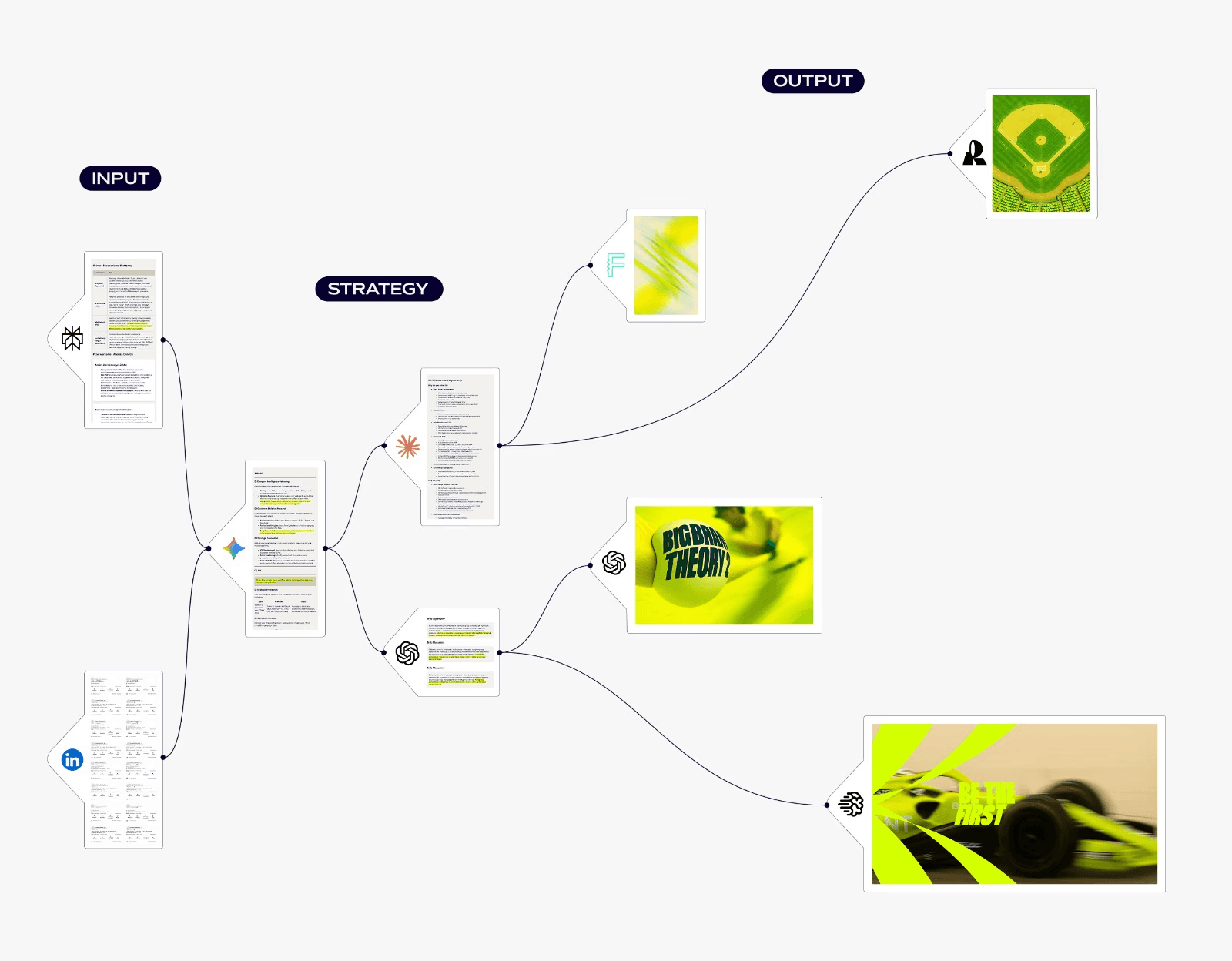
DFIRST is a platform where you connect AI tools on a canvas to create marketing campaigns faster. Instead of juggling multiple apps and manual work, you build workflows that handle everything from research to final ads.
→ The Canvas: Build campaigns by connecting simple nodes on a canvas. Draw lines to link research, writing, and image steps. The data moves automatically, so you don't copy-paste.
→ Research Built In: The platform checks multiple sources—competitor sites, social media, papers. Set up a research node to pull market data right into your content flow.
→ Creating Marketing Assets: Text nodes write ads and posts. Image nodes use tools like DALL-E to make visuals. The system keeps track, so your images always match your writing.
→ 50+ AI Model: You can use models like GPT-4, Claude, and Gemini. The platform chooses the best one for each task, or you can pick yourself. Pro users get faster, newer models.
→ Your Data Room: Upload your brand guides and old files. The AI learns from these documents to match your company's voice. Your private data is never used to train the models.
→ Working Space: Every campaign gets a dedicated whiteboard. Start with a template or ask the AI to build a workflow for you. Save the best ones to use again later.
For agencies doing client work, this matters. You can cut production time from weeks to hours while keeping everything consistent. Pricing: Free 80 tokens daily. Starter: $39/month. Pro: $199/month.
Generate your first flow for free - no credit card required.
Step 1: Start With a Clear Human Goal (Not a Tool)
Before I open any AI platform, I pause.
Not to think about prompts.
Not to think about word count.
Not to compare models.
I think about the outcome.
What should change after someone consumes this?
Should it generate leads?
Shift a belief?
Educate beginners?
Position authority?
Support a launch?
Nurture existing customers?
Most people ask, “Which AI tool should I use?”
That’s the wrong question.
The real question is:
What change am I trying to create?
AI multiplies direction. It does not create it.
If the goal is vague: “write a blog about AI” - the result will be vague.
If the goal is precise: “help marketing teams move from random prompting to structured workflows” - the writing gains focus instantly.
Before creating anything, I define four things:
Audience - Who exactly am I speaking to?
Problem - What frustration are they experiencing?
Shift - What belief should change?
Action - What should they do next?
Clarity here makes everything else easier.
AI isn’t there to generate words.
It’s there to accelerate movement from point A to point B.
Step 2: Think in Systems, Not Prompts
Using AI one prompt at a time is chaotic.
You open a tool, generate something, copy it, switch platforms, explain the idea again, adjust the output, and repeat. Context gets lost. Consistency weakens. The work feels fragmented.
That’s not a strategy. That’s patchwork.
Instead of thinking in isolated prompts, think in sequences.
Not: “Generate a blog post.”
But: Research → Summary → Angle → Outline → Draft → Visuals → Variations → Distribution
Each stage feeds the next.
Research shapes the angle.
The angle defines the outline.
The outline guides the draft.
The draft informs visuals.
Everything connects to a larger campaign objective.
When AI operates inside a structured sequence, randomness disappears. Decision fatigue drops. Output improves.
Prompts create content.
Systems create consistency.
And consistency is what makes content feel intentional rather than automated.
Step 3: Use AI for Structured Research (With Sources)
I never draft without research.
Most AI content feels generic for a simple reason: it’s built on generic input.
If you ask AI to “write a blog about AI content creation,” it will produce something fluent and forgettable. It draws from patterns it has seen thousands of times.
Authority doesn’t come from polished language.
It comes from an informed perspective.
So I use AI as an analyst, not a writer.
I ask it to:
Break down competitor arguments
Analyze top-ranking pages
Extract recurring themes
Identify overused angles
Surface audience objections
Highlight gaps in the conversation
Then I verify and organize everything. Sources are traceable. Claims are grounded. Insights are intentional.
This does two things:
1. It strengthens credibility.
My arguments are supported, not assumed.
2. It creates differentiation.
When I see what everyone else is saying, I can decide what to challenge, refine, or ignore.
Research first. Draft second.
Insight drives the writing - not templates.
Step 4: Turn Research Into a Summary Layer
Research is messy.
It’s filled with repetition, overlap, contradictions, and surface-level claims. Drafting directly from it usually produces scattered content.
Before writing, I compress the chaos.
I ask AI to extract:
Core themes across competitors
Claims everyone repeats
Angles that feel saturated
Gaps no one addresses
Strong supporting data
Weak or unproven assertions
Audience objections worth addressing
Then I condense everything into a structured summary - not paragraphs, just sharp bullet points.
For example:
Most articles focus on tools, not workflow design
Productivity is the dominant angle
Few discuss context retention
Almost none explain reusable campaign systems
Now I’m not just writing.
I’m positioning.
The summary layer gives direction. It shows me what to support, what to challenge, and where to differentiate.
Without this step, drafting feels reactive.
With it, the content becomes intentional.
Step 5: Draft With Context, Not Blank Prompts
I never draft from a blank prompt.
AI without context produces surface-level content. It fills space. It sounds fluent. But it lacks direction.
Before generating anything, I provide:
The target audience
Their core frustration
The belief I want to shift
Key insights from research
The chosen angle
A structured outline
Now AI isn’t guessing. It’s executing.
Compare the difference:
Generic prompt: “Write a blog about AI for content creation.”
Context-driven prompt: “Write a blog for marketing teams overwhelmed by fragmented AI tools. Shift their thinking toward structured workflows. Avoid generic productivity claims. Use research-backed positioning.”
The second instruction narrows the outcome. It defines tone, audience, and purpose.
That’s the difference between content and positioning.
AI accelerates the draft.
I refine the argument.
I tighten logic. Remove repetition. Improve transitions. Add counterpoints. Simplify complexity.
AI builds the first version.
I make it sharp.
Step 6: Generate Matching Visuals (Don’t Separate Design From Strategy)
I don’t treat visuals as an afterthought.
Most teams write first and design later. That disconnect shows. The copy says one thing. The visuals suggest another. The campaign feels assembled, not designed.
Instead, visuals are part of the same workflow.
Once the draft and positioning are clear, I use AI to generate:
Hero images that reflect the core idea
Visual metaphors that reinforce the argument
Carousel slides that break down the framework
Short-form videos derived directly from the script
Ad creatives aligned with the same angle
Because the visuals pull from the same research and summary layer, they don’t feel random. They reinforce the message.
When copy and visuals are developed inside one structured system, the campaign feels cohesive.
Good content explains.
Strong content demonstrates.
Visual alignment is what turns insight into something people remember.
Step 7: Route Tasks to the Right AI Model
Not all AI models think the same way.
Some are better at long-form reasoning.
Some are sharper with ad copy.
Some generate stronger visuals.
Some handle structured research better.
Using one model for everything is convenient - but rarely optimal.
I treat models like specialists.
Long-form drafts and structured reasoning → models built for depth
Ad copy and punchy variations → models optimized for brevity
Image generation → visual-first systems
Video → generative motion tools
Research synthesis → models designed for analysis
The goal isn’t to chase every new platform.
It’s to match the task to the strength.
When you route strategically, output quality increases without increasing effort. You stop forcing one tool to do everything and start building a stack that works as a coordinated unit.
AI becomes less experimental and more reliable.
Step 8: Store Brand Context in One Place
Consistency is the silent advantage most teams overlook.
Without a single source of truth, every new piece starts from scratch. Tone drifts. Messaging slips. Campaigns feel disjointed.
The fix: centralize context.
Store everything AI needs to stay aligned:
Brand voice and tone
Product features and key messaging
Past campaigns and successful examples
Audience personas and preferences
Style references for copy, visuals, and video
When AI draws from one place, every output - blog, social post, ad, or video - automatically stays on brand.
Platforms exist to make this effortless. They let you connect research, copy, and visuals in a single system so context flows naturally from one step to the next.
The result:
Fewer revisions
Stronger brand identity
Faster campaigns
Consistent messaging across channels
Centralized context turns AI from a series of tools into a single, coherent system.
Step 9: Build Reusable Campaign Workflows
The true power of AI isn’t speed.
It’s repeatability.
Most teams treat content as a one-off: blog, ad, video - done, then start over. It works, but it’s inefficient and inconsistent.
Instead, treat creation as a workflow you can reuse.
A strong workflow flows like this:
Research: Gather competitor pages, social posts, and trend insights
Summary: Extract key insights and gaps
Draft: Generate copy for blogs, ads, and emails
Visuals: Create images, carousels, and short videos
Review: Refine outputs, adjust tone, tweak prompts
Repurpose: Adapt content for multiple channels
Once the workflow exists, save it as a template. Next campaign? Duplicate. Update the brief. Run it again.
Benefits:
Consistency: Every campaign follows the same logic
Efficiency: Less time reinventing the wheel
Scalability: Produce more campaigns without adding headcount
Quality control: Tested workflows reduce errors
AI stops being a tool for one-off outputs. It becomes a reliable system that consistently produces high-quality content, aligned with your brand and strategy.
The principle is simple: build once, run many times. That’s how AI multiplies your impact.
Step 10: Use a Visual Workflow Instead of Fragmented Tools
Most teams fail not because of tools, but because their process is invisible.
When your workflow lives in tabs, memory, or scattered documents, every handoff is risky. You repeat instructions, check outputs manually, and lose context. Efficiency collapses. Consistency suffers.
A visual workflow solves this.
It shows the full pipeline at a glance:
Research feeds summaries
Summaries guide copy generation
Copy drives visuals and video
Outputs flow naturally into multiple channels
Everything is connected. Nothing slips through the cracks.
Once the system is visual and structured:
Clarity: You see the entire content ecosystem instantly
Efficiency: Switching between tools slows you less
Consistency: Tone and messaging remain aligned
Reusability: Workflows can be saved and applied to future campaigns
AI stops feeling like a collection of separate tools.
It becomes a single, coherent system - a content engine that scales thinking, not just output.
What AI Should NOT Replace
Even the most advanced AI can’t replace what makes content truly human: judgment, creativity, and strategic thinking. Using AI smartly means knowing what must remain human-led.
Insight and Perspective
AI can summarize trends and competitors, but it cannot form a unique point of view. Human experience shapes strategy.
Example:
When planning a campaign for a SaaS startup, AI might identify popular blog topics, but only a human can decide to challenge conventional thinking with a contrarian perspective that positions the brand as a thought leader.
Ethical Judgment and Sensitivity
AI doesn’t understand nuance, culture, or ethics. Humans must guide messaging to avoid tone-deaf or offensive content.
Example:
A social post about diversity could technically be accurate, but only a human can ensure it genuinely respects context and audience values.
Storytelling and Emotional Connection
AI can structure narratives, but it cannot create genuine tension, humor, or empathy. These elements require human intuition.
Example:
In a customer success story, AI might generate the facts, but a human storyteller knows how to highlight the customer’s emotional journey to make it relatable and memorable.
Prioritization and Trade-offs
AI can produce endless ideas, but deciding what’s most impactful, feasible, and aligned with goals is human work.
Example:
If AI generates ten social campaign concepts, a human decides which aligns with brand timing, budget, and audience resonance - filtering noise from opportunity.
Brand Voice and Identity
AI can mimic style, but only humans live the brand. Personality, tone, and subtle nuances must be curated to feel authentic.
Example:
For a luxury brand, AI may write grammatically correct captions, but a human ensures every word communicates elegance, exclusivity, and sophistication in line with brand identity.
Why Most AI Content Still Feels Robotic
Even the most advanced AI can produce flawless sentences that somehow feel… lifeless. It’s not about grammar or structure, it’s about the invisible signals that make writing human.
Predictable Rhythm
AI writes in patterns. Every sentence is a statistical guess, every paragraph a tidy progression. The result is smooth prose - but without the stumbles, hesitations, or surprises that give writing its heartbeat.
Emotional Flatline
AI can describe feelings, but it can’t feel them. Enthusiasm, frustration, curiosity, or doubt exist in words - but rarely in nuance. The writing is technically correct, but it lacks the subtle tension that makes a reader pause, smile, or nod.
Missing Perspective
AI doesn’t live a worldview. It can mimic tone, but it cannot bring lived experience, intuition, or bias. The result is content that speaks, but rarely argues, challenges, or convinces.
Uniform Voice
AI prefers neutrality. It avoids risk, humor, and stylistic deviation. Every sentence reads polished, but too safe. Distinctive voice - the invisible fingerprint of a human writer - disappears.
Shallow Context
AI sees the surface, not the currents beneath. Trends, culture, and audience sentiment are flattened into generalized statements. Accuracy exists, resonance does not.
The Difference Between “Using AI” and “Running AI”
AI is more than a tool you operate, it’s a system you orchestrate. Most people use AI: they input prompts, copy outputs, and call it done.
But the real impact comes when you run AI: you design structured workflows, integrate insights, and scale thinking across campaigns.
The difference isn’t speed, it’s strategic leverage.
Using AI | Running AI |
Executes tasks individually | Coordinates AI across a full workflow |
Works in isolation, prompt by prompt | Maintains context across content, visuals, and channels |
Produces output | Produces outcomes and measurable results |
Reactive: you tell it what to do | Proactive: you design the process for maximum impact |
Focused on short-term speed | Focused on long-term efficiency, consistency, and scale |
Output feels generic or disconnected | Output is cohesive, aligned, and brand-true |
AI follows instructions | You direct AI with insight and strategy |
When you run AI, you’re no longer just generating content - you’re building a system that multiplies human intelligence, maintains brand voice, and delivers repeatable, high-quality campaigns.
Final Thoughts
AI doesn’t replace thinking.
It multiplies it.
If your thinking is shallow, AI just scales shallow content.
If your process is fragmented, AI just scales chaos.
But when you pair structured human insight with intentional AI workflows:
Research informs strategy
Drafts are context-driven
Visuals reinforce messaging
Workflows are reusable and consistent
You don’t just create content faster.
You create content that matters.
AI becomes more than a tool.
It becomes a system for smarter, more deliberate work - one that amplifies clarity, consistency, and impact.
The difference isn’t in the AI you use.
It’s in the workflow you design.
. . .
Before You Go
There you have it.
There are so many great AI marketing tools out there. I hope this list has given you a good overview of the tools available to help you with your decision-making process.
Once you've had a chance to research all your options, we'd love to help you connect your favorite tools and build faster campaigns.
That's exactly what DFIRST does—it lets you connect your AI tools on a single canvas to create marketing campaigns faster.
Explore how orchestration changes your workflow - no credit card required
Build your first campaign system inside DFIRST and see the difference.